
Button
@cfa/react-components
@cfa/react-primitives
Figma
Storybook
Buttons are clickable elements that are used to trigger actions. They communicate calls to action to the user and allow users to interact with pages in a variety of ways. Button labels express what action will occur when the user interacts with it.
Development
<Button color="primary" size="lg" variant="filled"> Button</Button><Button>Primary</Button>Variants
Each Button variant has a particular function, which is recognized by the user through its design. It is important that the different variants are implemented consistently across Chick-fil-A products, so that they message the correct actions.
-
Filled - The filled variant should be used for buttons with primary actions. These actions should be the most important on the page, typically indicating the next likely action the user will take (e.g. Continue, Checkout, Sign In). It is advised to have a single filled button on each screen for emphasis. On interfaces where there are multiple next likely actions it is at the product owner’s discretion which styles to use.
-
Outlined - Use an outlined button for non-primary actions. This secondary action treatment allows for multiple actions within a set and on a page without creating a large cognitive load. This treatment is ideal for actions that occur multiple times within a page (e.g. product cards).
-
Text - The text button is used for deprioritized actions, but not to be confused with a link. Use for secondary or tertiary actions that do not require the prominence of a button treatment. (e.g.
Change Address,Show More/Show Less). -
Destructive - Th destructive button variant is specifically used when emphasis is needed upon irreversible action, such as deleting or replacing user information or data. Button labels should have a single and obvious confirmation action to eliminate confusion for the user. Destructive buttons are mainly used in resturant software products, where Chick-fil-A Blue is used as the primary button color.
Usage
Do’s and Don’ts
Do: Apply the same color theme consistently across the interface to ensure a cohesive and harmonious user experience — as shown in Fig. 2
Don’t: Mix color themes as it can create dissonance. For instance, don’t pair a primary red button with a secondary navy one, as shown in Fig. 3, as it disrupts the visual flow and can be jarring for the user.
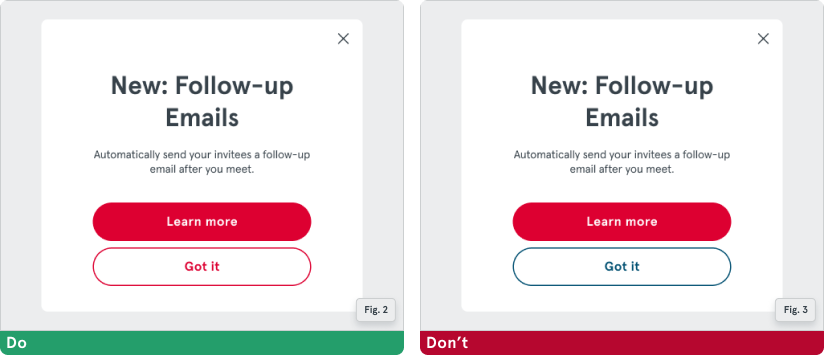
We understand the challenges in choosing the correct colors and styles for non-primary designs in your applications. To assist with this, we offer variants. These are alternative styles for buttons representing primary, secondary, tertiary, and destructive actions.
Accessibility
W3C
A button is a widget that enables users to trigger an action or event, such as submitting a form, opening a dialog, canceling an action, or performing a delete operation. A common convention for informing users that a button launches a dialog is to append ”…” (ellipsis) to the button label, e.g., “Save as…”.
Lorem ipsum
- Lorem ipsum dolor sit amet, consectetur adipiscing elit, sed do eiusmod tempor incididunt ut labore et dolore magna aliqua.
- Ut enim ad minim veniam, quis nostrud exercitation ullamco laboris nisi ut aliquip ex ea commodo consequat.
- Duis aute irure dolor in reprehenderit in voluptate velit esse cillum dolore eu fugiat nulla pariatur.
- Excepteur sint occaecat cupidatat non proident, sunt in culpa qui officia deserunt mollit anim id est laborum.